
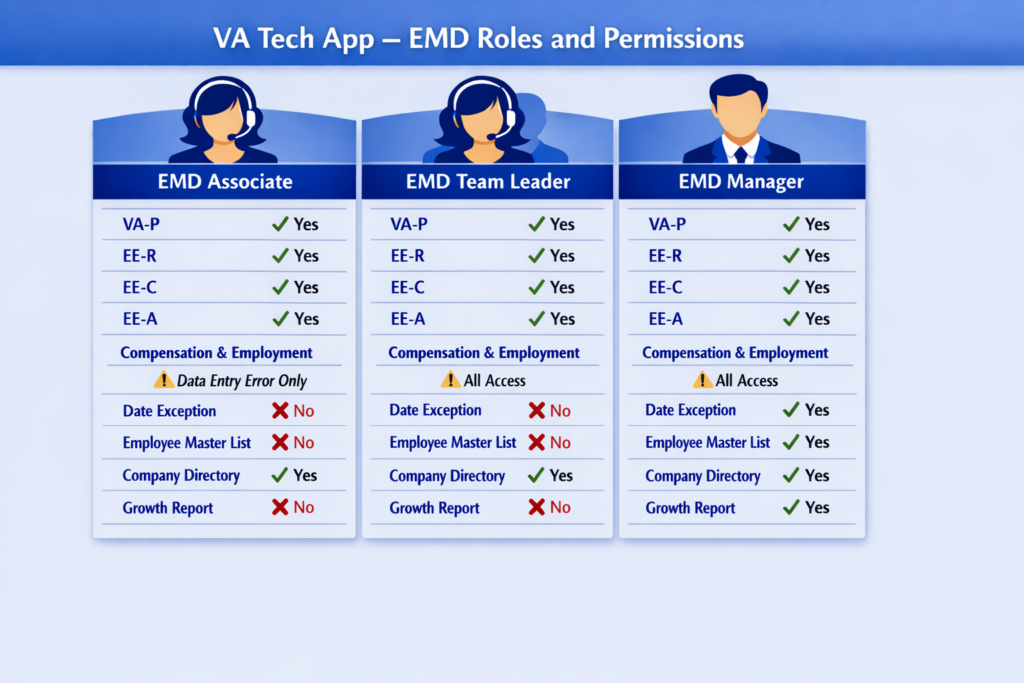
There are three user roles in EMD, each with its own functions and permissions across the different sections of the EMD module.
EMD Associate Role
Has full access to VA-P, EE-R, EE-C and EE-A. Can access Employee Compensation & Employment but can only edit Data Entry Error. Can generate Company Directory report.
EMD Team Leader Role
Has the same access as EMD Associate Role, plus access to all type of edit reason for Employee Compensation & Employment.
EMD Manager Role
Has the same access as EMD Team Leader Role, plus the ability to generate the Date Exception Report, Employee Master List and Growth Report.
The graphics below outlines the modules and permission types for each user role:
User Access Approval Authority