
The Client Contract Team Assignment Main View (CCTA) serves as the central workspace for assigning and managing team members associated with client contracts. This page allows users to search, filter, review contract assignment details, and add, edit or deactivate contract team assignments for clients.
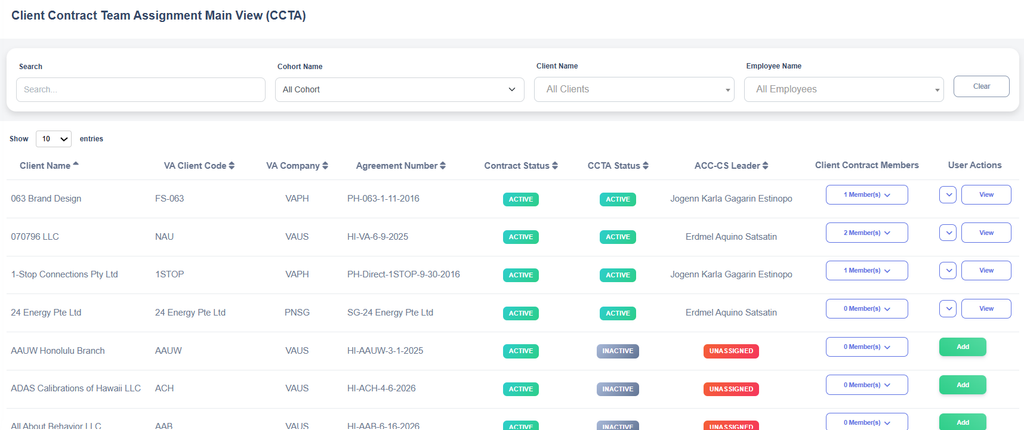
Search and Filter Section

The Search and Filter section allows users to quickly locate specific client contract assignments within the CCTA list.
- Search – Enter keywords such as the Client Name, VA Company, Agreement Number, or ACC-CS Leader name to find matching records.
- Cohort Name – Select a cohort from the dropdown list to display only records associated with the selected Cohort.
- Client Name – Select a client from the dropdown list to display only records associated with the selected client.
- Employee Name – Select an employee to view contracts assigned to that specific employee.
- Clear – Click the Clear button to reset all search criteria and filters, returning the grid to its default view.
This feature helps users efficiently find and manage client contract team assignments without manually browsing through all records.
Column Descriptions
- Client Name – Displays the name of the client associated with the contract.
- VA Client Code – Shows the unique code assigned to the client within the system.
- VA Company – Identifies the VA company associated with the client contract.
- Agreement Number – Displays the contract or agreement reference number for the client.
- Contract Status – Indicates whether the client contract is currently active or inactive. Contract status is managed in the CMD module.
- CCTA Status – Shows the current status of the Client Contract Team Assignment record.
- ACC-CS Leader – Displays the assigned ACC-CS Leader for the contract. Shows Unassigned if no ACC-CS Leader has been assigned.
- Client Contract Members – Shows the number of active team members assigned to the client contract.
User Actions
The User Actions column provides options for managing Client Contract Team Assignment records.
| Buttons | User Actions |
 | Allows users to create a new Client Contract Team Assignment and assign the initial ACC-CS Leader when a client contract is newly created. |
 | Opens the selected Client Contract Team Assignment record for review. |
 | Allows users to modify assignment details, including the ACC-CS Leader and Client Contract members. |
 | Changes the CCTA status to Inactive, removing the assignment from active use when Operations needs to stop or pause. |
 | Changes an Inactive CCTA record back to Active, making the assignment available for use again. |