
Client Master Database (CMD) Overview
The Client Master Database (CMD) helps keep all client and contract information in one place. It’s designed to make records easier to manage, avoid duplicates, and ensure details stay accurate.
CMD manages records of clients and contracts, including all essential details such as basic and VA specific client information. Client contract information such as client contact, service and revenue type and billing details. This ensures that critical client and contract data is centralized, structured, and easily accessible for operational and reporting needs.
The CMD is organized into three main sections: the Client Record, the Contract Record, and Reports & Analytics.
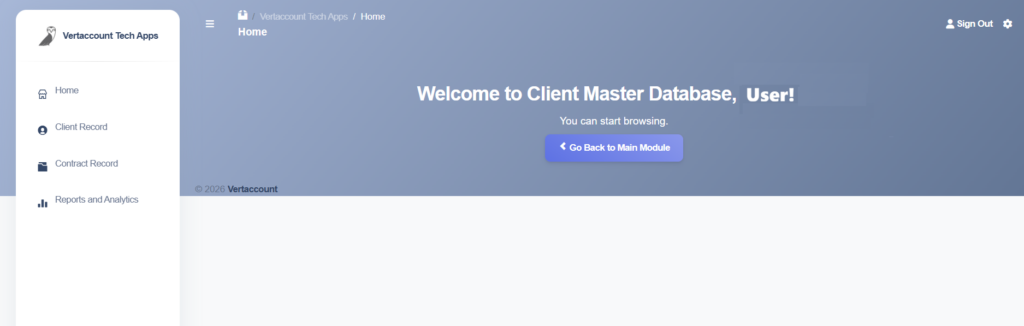
- The Client Record displays a list of active and disengaged clients, with options to search, add, view, update, and disable client records.
- The Contract Record displays a list of active and inactive contracts, with options to search, add, view, update, and disable contract records.
- The Reports & Analytics generates reports, including Client and Contract Retention and Churn Rates, as well as Client and Contract Master Lists.
The Relationship Between the Client & Contract Records
The Client and Contract Records are two directly related lists. One cannot work without the other.
The Client Record is a master list of Vertaccount’s customers. There can only be one client or customer record in the CMD.
On the other hand, a client can have multiple (or more than one) contracts with Vertaccount. For example, Client A has one record in the Client Record but may have two records in the Contracts Record.
In most cases, a customer only has one contract, so there will typically be just one record in both the Client Dashboard and the Contracts Dashboard.
Who are the Users of the CMD?
CMD Users are members of VA’s internal finance and accounting team only, who are also known as Team Big Island.
Not all members of Team Big Island will have access to CMD.
Refer to the user permissions page for details of access control.
When is CMD used?
CMD is used when VA engages with a new client, changes occur in an existing contract or a client disengages from VA. All those changes must be entered in the CMD.
Why does CMD exist? (Why is it so important?)
CMD will act as the central and official repository of all customer contracts across the VA group of companies. As you realized by now, contracts are the lifeblood of company’s revenues and obligations.
We cannot underestimate the importance of the CMD.