
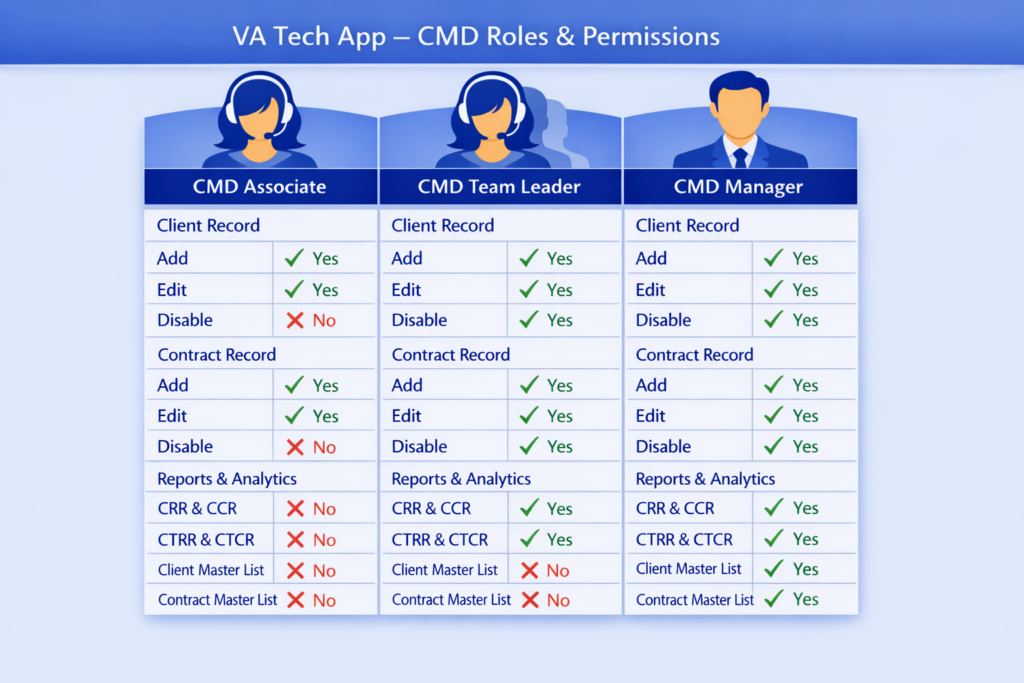
There are three user roles in CMD, each with its own functions and permissions across the different sections of the CMD module.
CMD Associate Role
Has access to the Client Record and Contract Record. Can view, create, and edit clients and contracts.
CMD Team Leader Role
Has the same access as CMD Associate Role, plus access to the Reports & Analytics section. Can also disable clients and contracts and generate CCR & CRR and CTCR & CTRR reports.
CMD Manager Role
Has the same access as CMD Team Leader Role, plus the ability to generate the Client and Contract Master List.
The graphics below outlines the modules and permission types for each user role:
User Access Approval Authority