
The Employee Compensation & Employment Type Management Main View module provides a centralized dashboard for managing compensation and employment types of each employee within the organization. This section allows users to search, add, view or update records, making it easier to keep employee compensation and employment type accurate and up to date.
Employee Compensation & Employment Type Management Main View
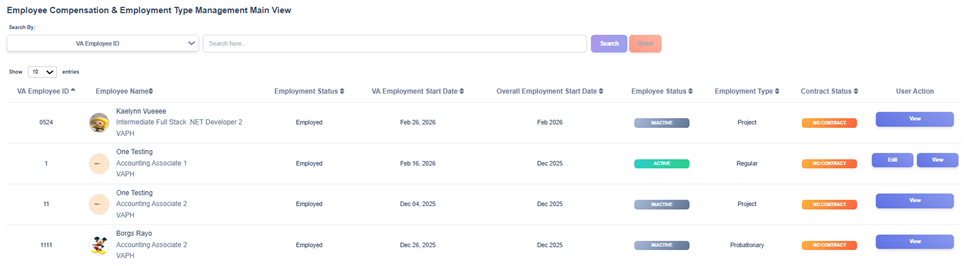
The Employee Compensation & Employment Type Management Main View provides users with an organized list of all employee compensation and employment records stored in the EMD. It includes essential data such as the VA employee ID, name, employment status, employments start dates, employee status, employment type, and contract status.
Employee Status
Each record includes an Employee Status column that indicates the current state of the employee’s employment status:
- Active – The employee is still engaged in active service.
- Inactive – The record is inactive but retained for audit and historical tracking.
User Actions
For each record in the list, users are given several action buttons for managing employment data:
- Add – Allows addition of new compensation and employment details to a newly created employment record.
- Edit – Allows modifications to existing record such as updating compensation and employment details or correcting entries.
- View – Displays an inactive record in read-only mode, ensuring historical employment information remains accessible for audit or reference purposes.